

Process automation with Camunda 8
from BPMN to productive software
Camunda 8 workflows for back office and manufacturing. Document AI for incoming invoices, approvals and supplier workflows.
We digitalise workflows that today run manually through your case handling and manufacturing. Camunda 8 as backbone, Kafka for eventing, document AI for unstructured inputs.
When do you need this?
Your back office runs in Excel and email chains
status is nowhere reliable, ownership is unclear.
You have a process
with clear steps that runs manually only because no off-the-shelf tool fits.
You have BPMN diagrams,
but nobody has turned them into productive code.
You want to measure
how long each step takes — and where the bottleneck sits.
What we deliver
Camunda 8 workflows
from BPMN diagram to productive application with webhooks, service tasks and human tasks.
Document AI
for classification and data extraction from incoming invoices, delivery notes, applications.
Event-driven architectures
with Apache Kafka for scalable, decoupled steps.
Escalation and SLA logic
SLA breaches escalate automatically.
Dashboards
for business and management — lead times, bottlenecks, SLA fulfilment.
Integration with legacy systems
SAP, Microsoft Dynamics, ProAlpha, Salesforce, custom case-management.
Methodology
- 01
Analysis call
60 minutes on one concrete process — where time is lost and which step is the biggest lever.
- 02
Next step
if the scope is clear, you receive an offer. For more complex processes we model the as-is and target state first (Domain Storytelling, BPMN) in a paid concept phase — including which steps get automated, which are supported and which stay manual.
- 03
Implementation
once commissioned, we build the workflows including happy path and escalation paths, delivered in 2-week sprints.
- 04
Rollout & operations
go-live in the real process, then operations and further development on request.
From real projects
A process that does not stop at a workflow diagram.
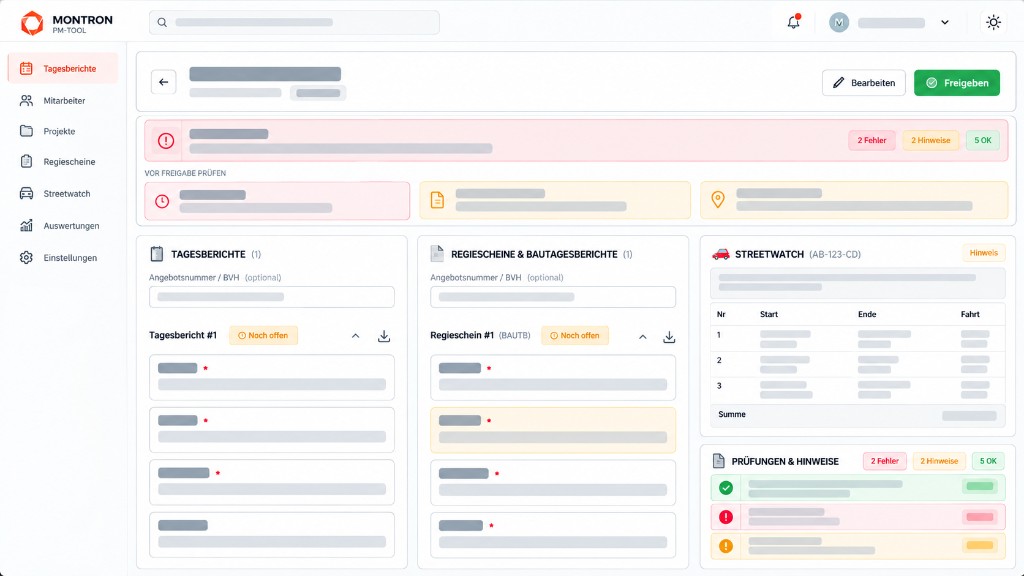
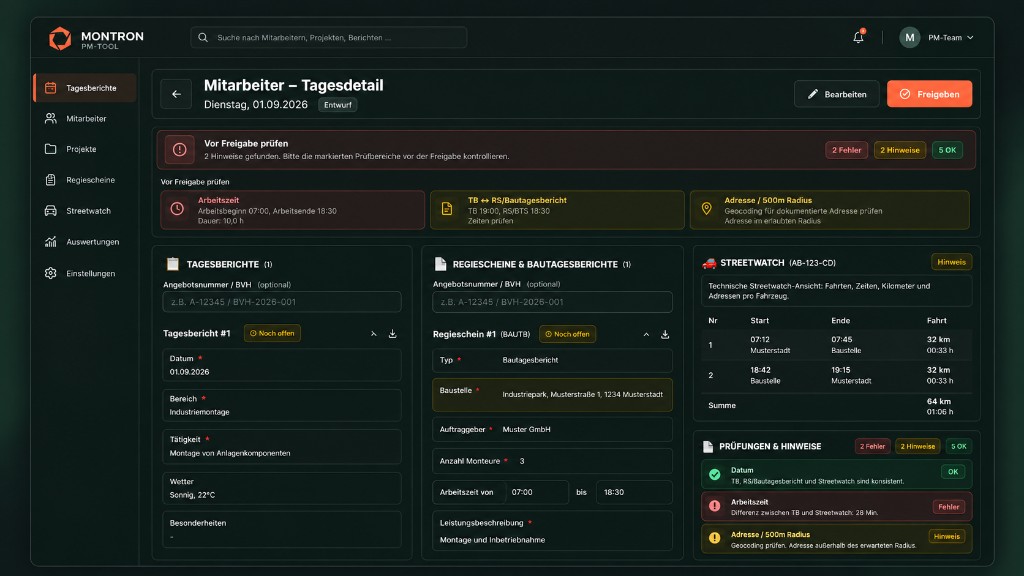
The Montron PM Tool connects mobile-captured work data, validation rules, corrections and approvals into one office flow.
Bring the data together
Site report, time-and-material slip and GPS trip data (Streetwatch) sit side by side for each day.
Validate automatically
The reconciliation marks days as OK, notice or error.
Correct with a trail
Original data from the mobile capture stays intact. Corrections are stored separately, with an audit trail.
Approve and document
Approval creates an immutable snapshot and PDFs for hour records and customer records.
Typical use cases
Possible scenarios. Not a description of a delivered project.
Incoming-invoice workflow
with document AI + Camunda + ERP integration (industry back office)
Claims processes for insurers
from intake via triage to payout
KYC onboarding for banks
automated pre-check, escalated compliance step
Supplier onboarding for industry
master data, NDA, order confirmation as end-to-end workflow
Citizen-request management for public sector
intake, classification, processing
Camunda experience
We have used Camunda 8 (cloud or self-managed) productively since the first versions and have experience with:
Camunda Cloud
for lightweight workflows without infrastructure overhead
Self-managed
for data-residency requirements (EU AI Act, NIS-2, DORA)
Migration from Camunda 7 to 8
in productive environments
Integration into Spring Boot back-ends
and React front-ends
Tasklist UI
and custom front-ends for case handling
Frequent questions
Do we need Camunda Cloud or self-managed?
Depends on data residency and compliance. We assess this in the analysis call and recommend the fitting variant.
Can you take over existing BPMN diagrams?
Yes. We import existing diagrams and check them for completeness and implementability.
How do you integrate document AI into the workflow?
As a service task in the Camunda process. Document-AI service returns structured data, the workflow continues based on it.
What happens with model errors?
Every AI-driven step has a human escalation path. Confidence thresholds and audit logs are standard.
Which process costs your team time every day?
In a free analysis call we look at it together and clarify whether automation makes sense.
60 minutes · no obligation